
Deploying a Model from the OpenShift AI Dashboard
This document walks through serving a large language model with vLLM on OpenShift AI, using the OpenShift AI dashboard to create the deployment. The model weights are read from a PersistentVolumeClaim (PVC) in your project rather than from object storage.
The worked example deploys Qwen2.5-3B-Instruct, but the same steps apply to any model vLLM supports, to do this substitute your own repository name and directory.
If you have not logged in to the cluster yet, start with the user onboarding documentation.
Before you begin
You will need:
- The
ocCLI, logged in to the cluster. See Logging in with the CLI. - Access to the OpenShift AI dashboard. See Accessing OpenShift AI.
- A HuggingFace access token, if the model you want to serve is a gated repository.
- Enough quota for a GPU workload. A 3B model at float16 needs one GPU, several CPU cores, and
more memory than the default project quota allows. Check your quota with
oc get resourcequota(see Checking your quota) and open a ticket at https://osticket.massopen.cloud if you need it raised.
The dashboard can select an existing PVC as a model source, but it cannot populate one. Everything up to Load the weights onto the PVC prepares the storage from the command line; from Start the deployment in the dashboard onward, the work happens in the dashboard.
Project Checks
First make sure you are on your project and it is labeled correctly.
oc project <your-project-name-here>
Check if your namespace is labeled correctly:
oc get namespace <your-project-name-here> -o jsonpath='{.metadata.labels.modelmesh-enabled}{"\n"}'
false
You should see false.
Also check the dashboard label:
oc get namespace <your-project-name-here> -o jsonpath='{.metadata.labels.opendatahub\.io/dashboard}{"\n"}'
true
You should see true.
If either label has the wrong value (or is empty), run:
oc label namespace <your-project-name-here> \
  opendatahub.io/dashboard=true \
  modelmesh-enabled=false \
  --overwrite
Create the model storage PVC
The weights have to live somewhere before either the loader job or the model server can start,
so create the PVC now. The PVC must be ReadWriteMany so that both can mount it. On this
cluster, pure-fb-nfsv4 is the RWX-capable storage class.
oc apply -f - <<'EOF'
apiVersion: v1
kind: PersistentVolumeClaim
metadata:
  name: qwen-model-pvc
  labels:
    opendatahub.io/dashboard: "true"
  annotations:
    openshift.io/display-name: qwen-model-pvc
spec:
  accessModes:
    - ReadWriteMany
  storageClassName: pure-fb-nfsv4
  resources:
    requests:
      storage: 20Gi
EOF
Size the PVC for the model you are downloading, with room to spare. Qwen2.5-3B-Instruct is roughly 5.8 GB across 12 files.
Confirm the PVC actually exists before going any further:
oc get pvc qwen-model-pvc
NAME             STATUS   VOLUME     CAPACITY   ACCESS MODES   STORAGECLASS    AGE
qwen-model-pvc   Bound    pvc-...    20Gi       RWX            pure-fb-nfsv4   10s
The status may briefly be Pending while the volume is provisioned. It must reach Bound,
with RWX under ACCESS MODES. If oc get pvc returns nothing, the PVC was not created and
the loader job in the next-but-one step will never be scheduled.
Store your HuggingFace token
Skip this step if the model repository is not gated.
oc create secret generic hf-token --from-literal=token=<your-hf-token>
Do not put the token directly into a YAML file you intend to commit.
Load the weights onto the PVC
This job mounts the PVC created in
Create the model storage PVC at /mnt/models and downloads the
model into a subdirectory. The PVC has to exist first — the job's pod cannot be scheduled
otherwise, and the job will sit at 0/1 completions indefinitely rather than failing.
If you are using a different model than
Qwen2.5-3B-Instruct, update the MODEL_REPO
and MODEL_DIR variables. If you gave the PVC a name other than qwen-model-pvc, update
claimName to match.
oc apply -f - <<'EOF'
apiVersion: batch/v1
kind: Job
metadata:
  name: model-loader
spec:
  backoffLimit: 1
  template:
    spec:
      restartPolicy: Never
      containers:
        - name: loader
          image: registry.access.redhat.com/ubi9/python-311:latest
          env:
            - name: MODEL_REPO
              value: Qwen/Qwen2.5-3B-Instruct
            - name: MODEL_DIR
              value: Qwen2.5-3B-Instruct
            - name: HF_HOME
              value: /tmp/hf
            - name: PYTHONPATH
              value: /tmp/pylibs
            - name: HF_TOKEN
              valueFrom:
                secretKeyRef:
                  name: hf-token
                  key: token
                  optional: true
          command:
            - /bin/bash
            - -c
            - |
              set -euo pipefail
              pip install --quiet --target "$PYTHONPATH" "huggingface_hub[hf_xet]"
              export PATH="$PYTHONPATH/bin:$PATH"
              hf download "$MODEL_REPO" --local-dir "/mnt/models/$MODEL_DIR"
              ls -la "/mnt/models/$MODEL_DIR"
          volumeMounts:
            - name: model-store
              mountPath: /mnt/models
          resources:
            requests:
              cpu: "1"
              memory: 4Gi
            limits:
              cpu: "2"
              memory: 8Gi
      volumes:
        - name: model-store
          persistentVolumeClaim:
            claimName: qwen-model-pvc
EOF
Wait for it to finish:
oc wait --for=condition=complete job/model-loader --timeout=1800s
The transfer usually takes well under a minute for a model this size. If oc wait has not
returned after a couple of minutes, the pod is probably not running at all — check with:
oc get jobs
oc events
A FailedScheduling event reading persistentvolumeclaim "qwen-model-pvc" not found means the
PVC was never created. Go back to
Create the model storage PVC, then delete and re-apply the job
with oc delete job model-loader.
Confirm the files landed:
oc logs job/model-loader | tail -20
You should see the contents of /mnt/models/Qwen2.5-3B-Instruct — config.json, the
*.safetensors shards, the tokenizer files, and so on. Note the directory name: you will type
it into the dashboard under
Point the deployment at the PVC.
Start the deployment in the dashboard
In the OpenShift AI dashboard, go to Data Science Projects → my-project → Models, then choose to deploy a model on the single-model serving platform.
It should look like this:
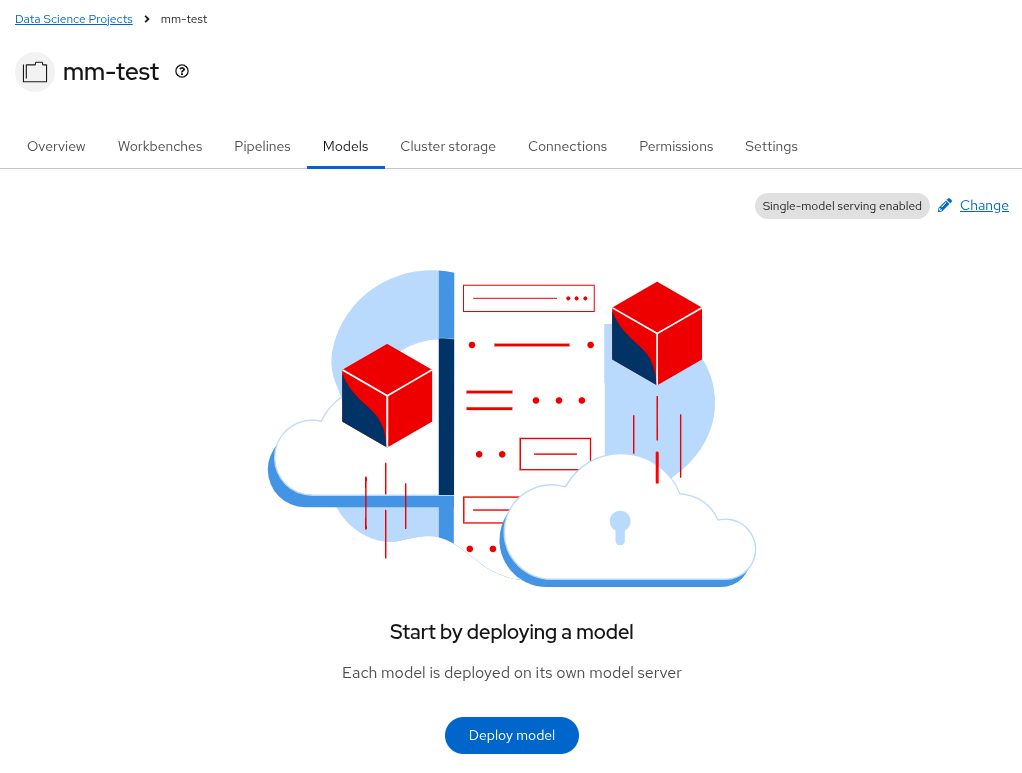
To begin deploying a model, click Deploy model and fill in the form:
-
Model deployment name. We will use the name
qwen-model. You can use whatever name you choose, just make sure you update the field when you inference with the model.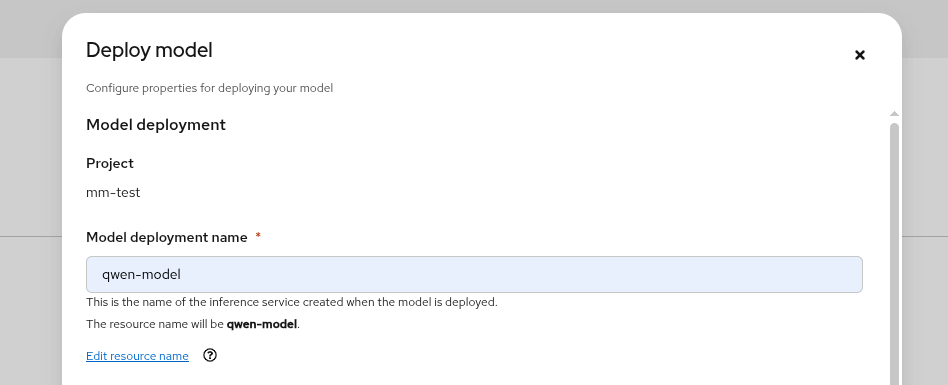
-
Serving runtime. We will use vLLM NVIDIA GPU ServingRuntime for KServe. The Model framework field autopopulates with
vLLM.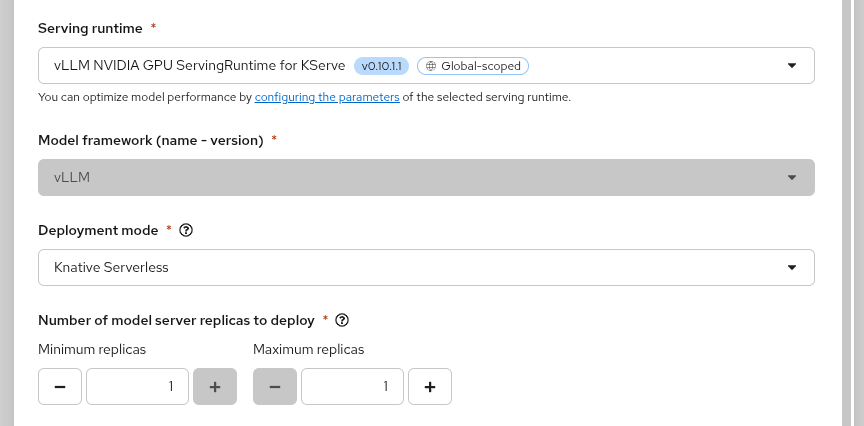
-
Framework and deployment mode. You do not need a framework, and in this example we can pick
Knative Serverless.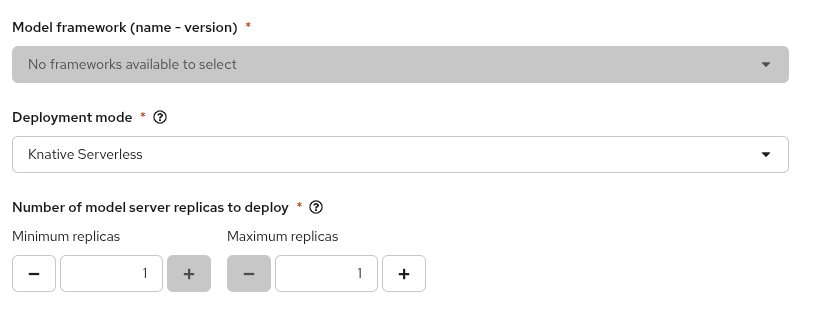
-
Hardware profile. Pick NVIDIA A100 GPU or NVIDIA H100 GPU — we will use H100s in this example.
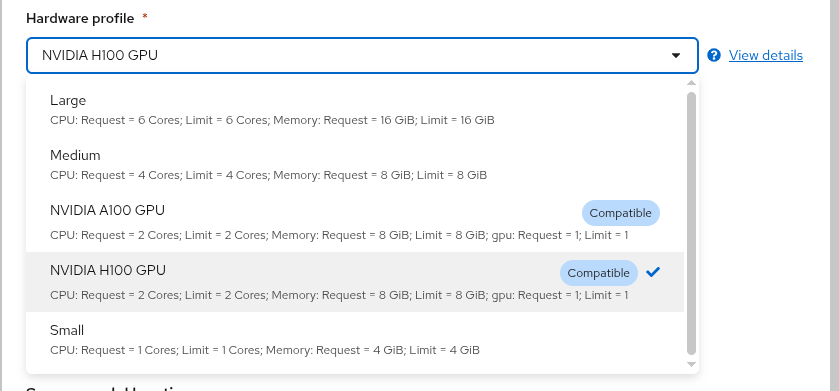
Point the deployment at the PVC
- Under the source model location, select the Existing cluster storage option.
It should look like:
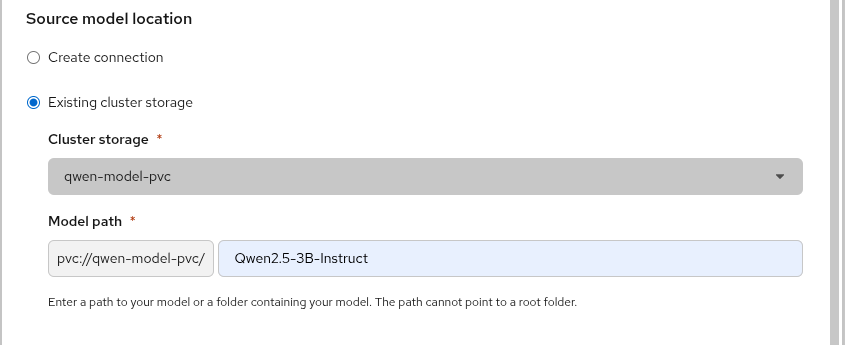
Two fields appear:
-
Cluster storage — select
qwen-model-pvc. -
Model path — this field is prefixed with a fixed, non-editable
pvc://qwen-model-pvc/. Enter only the remainder:Qwen2.5-3B-InstructOR
<whatever-your-personal-model-path-is>
The resulting URI is pvc://qwen-model-pvc/Qwen2.5-3B-Instruct. The field is validated against
/^pvc:\/\/[a-zA-Z0-9-]+\/[^/\s][^\s]*$/, which in practice means:
- No leading slash.
/Qwen2.5-3B-Instructis rejected. This is easy to get wrong, because inside the loader pod the directory really is at/mnt/models/Qwen2.5-3B-Instruct— but the path here is relative to the root of the PVC. - Not empty. The path cannot point at the PVC root; the model must live in a subdirectory.
- No whitespace. Dots and hyphens are fine.
If you see the warning "The access mode of the selected cluster storage is not
ReadWriteMany", the PVC was not created as RWX. Recreate it with
accessModes: [ReadWriteMany] as shown in
Create the model storage PVC.
Deploy and verify
Click Deploy. The model appears in the project's model list and moves to a started state once vLLM has loaded the weights — expect a few minutes, most of it spent reading the model off the PVC and into GPU memory.
From the CLI you can watch the same thing:
oc get inferenceservice
oc get pods -l serving.kserve.io/inferenceservice=qwen-model
To follow the model server's startup:
oc logs -f -l serving.kserve.io/inferenceservice=qwen-model -c kserve-container
The dashboard shows the inference endpoint on the model's row once it is ready. It should look like:

Using the model
The deployment serves an OpenAI-compatible API. Using the endpoint from the dashboard:
curl -sk https://<endpoint>/v1/chat/completions \
  -H "Authorization: Bearer <token>" \
  -H "Content-Type: application/json" \
  -d '{
    "model": "qwen-model",
    "messages": [{"role": "user", "content": "What is OpenShift?"}],
    "max_tokens": 100
  }'
Drop the Authorization header if you deployed without token authentication. If you did not
expose an external route, the endpoint is only reachable from inside the cluster — run the
curl from a pod in your project, or use oc port-forward.
Other useful endpoints: GET /v1/models and POST /v1/completions.
Cleaning up
GPUs are a scarce shared resource. Delete the deployment when you are not using it — either from the dashboard, or:
oc delete inferenceservice qwen-model
oc delete job model-loader
Deleting the InferenceService releases the GPU. The PVC and its weights survive, so you can redeploy later without downloading the model again. To reclaim the storage as well:
oc delete pvc qwen-model-pvc
Troubleshooting
Your project does not appear in the dashboard
- The namespace is missing the
opendatahub.io/dashboard=truelabel.
Only S3 / URI / OCI shown under source model location
- The PVC is missing the
opendatahub.io/dashboard=truelabel. Add the label, then reload the page.
"The access mode ... is not ReadWriteMany"
- The PVC was not created as RWX. Use the
pure-fb-nfsv4storage class withReadWriteMany.
Model path rejected by the form
- The path contains a leading slash, or a path pointing at the PVC root.
Loader job never completes, and oc logs job/model-loader prints nothing
- The pod was never scheduled, so there are no logs yet. Run
oc eventsand look forFailedScheduling.persistentvolumeclaim "qwen-model-pvc" not foundmeans the PVC does not exist —oc get pvcwill be empty. Ifoc get templateslistsmodel-pvc, you registered the template but never processed it; see Create the model storage PVC.
Model server pod stuck in Pending
- No hardware profile selected, so the pod has no toleration for the GPU node taint, or the cluster has no free GPU.
Deployment rejected, or pod never created
- Project quota exceeded. Check
oc get resourcequotaand request an increase.
vLLM starts but cannot find the model
- The Model path does not match the directory the loader job wrote. Check
oc logs job/model-loader.
Loader job fails with a 401 or 403
- The model repository is gated and the
hf-tokensecret is missing, wrong, or lacks access to that repository.
If you are stuck, open a ticket at https://osticket.massopen.cloud.